

Before assigning your group seats, ask RL Transport to confirm the allocated vehicle and provide its applicable seating layout or another clear way to identify passenger seats. A coach seating plan needs to match that allocated vehicle. A capacity label tells you a vehicle size; it does not show where your group can sit together. Keep assignments provisional until you can match them to the vehicle intended for your journey.
For an organiser, the useful result is more than a picture of seats. You need a working list that connects each travelling party to confirmed seat references, records unanswered questions and tells helpers which version to use. The worksheet and handover method below are suggested organising tools, rather than an RL seating chart or a promised seat-allocation service.
A seat count is not a seating plan
RL has a dedicated 45-seater coach page, but that vehicle description is not a numbered seating chart. Do not turn the number in its name into assumed rows, pairs or positions. Likewise, a diagram found for another operator cannot establish the arrangement of your allocated RL vehicle.
Separate two decisions: whether the vehicle is appropriate for the journey, and how to organise passengers once its seating is confirmed. If you are still choosing the vehicle, use RL’s fleet overview for that discussion. Return to seat assignments after RL has answered the vehicle-specific questions. Otherwise, an attractive spreadsheet can give your group confidence in arrangements that have never been checked.
Request the information that makes assignments possible
Start with the trip date and the particular leg you are planning. An outward transfer and a return journey need separate checks if the travelling group or allocated vehicle differs. Ask RL which vehicle the seating information applies to and how you should recognise the current layout information if it is updated.
Request confirmation of the passenger seats available for your booking, plus a usable layout or seat-reference method. If the information has no seat identifiers, ask how an organiser should describe an assignment unambiguously. Do not invent a numbering system and present it to passengers as though it were marked inside the coach.
Next, explain practical requirements that could affect the plan: parties hoping to stay together, the luggage or equipment being brought, and any boarding or access arrangements that need discussion. Ask RL to confirm what is suitable for the allocated vehicle. A request is not confirmation, and a preferred seat position cannot establish boarding or access suitability.
Keep the enquiry focused on practical arrangements. You do not need to attach passenger identity documents or health records to a public enquiry form. Where an individual needs a private discussion about assistance, ask RL how to handle that conversation appropriately rather than circulating sensitive details in a group seating sheet.
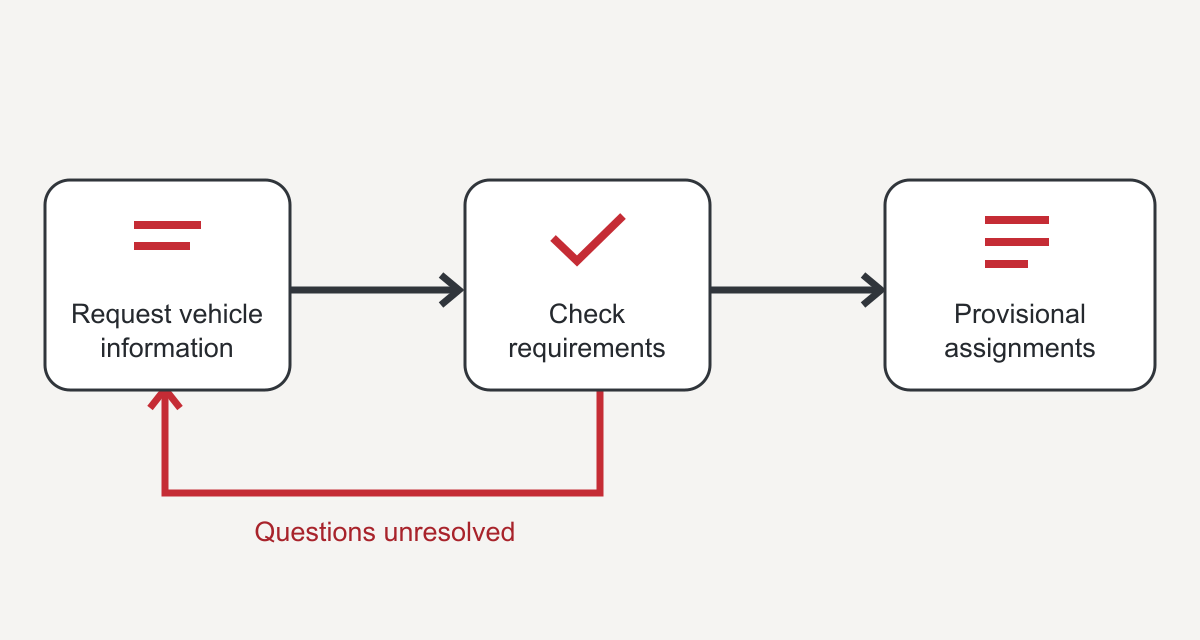
Build a worksheet before filling seat references
Use one row per travelling party, with a separate row where only some members travel on a particular leg. Group codes let helpers discuss assignments without putting passenger names on every working copy. Keep any private name-to-code list separately with the organiser who needs it.
The table below is a blank planning template. Copy the fields into your own worksheet and add rows as needed. Leave the seat-reference field unassigned until RL supplies a clear reference method; a blank is more useful than a guessed position that later gets mistaken for a promise.
| Field | What to enter | Check before sharing |
|---|---|---|
| Trip leg | Date, journey and pickup point | Does this row apply to the outward trip, return, or both? |
| Group code | A private organiser-assigned party code | Can the responsible helper identify the party? |
| Party size | Number travelling on this leg | Has the organiser checked the current count? |
| Keep-together preference | Requested, flexible, or not requested | Is this still a preference or an agreed arrangement? |
| Seat reference | Unassigned until the reference method is confirmed | Does it match the applicable vehicle information? |
| Status | Awaiting information, provisional, or checked | What evidence supports this status? |
| Unresolved question | A specific practical question and its owner | Who must answer before this row is ready? |
| Version and date | Current worksheet version and update time | Does it match the organiser’s master copy? |
At the top of the worksheet, record the responsible organiser and the vehicle information used to prepare it. Keep booking confirmation separate from assignment status. A confirmed journey does not by itself mean that your proposed passenger positions have been checked, and a checked worksheet does not replace the operator’s booking information.
Turn confirmed information into provisional assignments
First reconcile the party sizes for each leg with your actual travelling group. Count every person once on the leg they are taking, including organisers travelling with the group. Then compare that total with the passenger seating RL has confirmed for the proposed arrangement. If those figures do not reconcile, stop assigning and ask RL to resolve the discrepancy.
Next, work through keep-together preferences using the supplied seat references. Record what remains unresolved rather than splitting a party silently or promising adjacent positions you cannot verify. Two parties requesting the same positions is a worksheet conflict to resolve before sharing, not a decision to leave to boarding time.
Check that no seat reference appears against more than one passenger assignment on the same leg. Conversely, an unused reference is not an invitation to add another traveller without checking the updated group requirements. Luggage and boarding questions should stay visible until RL answers them; do not mark them resolved simply because all names fit on a list.
For the wider enquiry and confirmation process, refer to RL’s bus charter booking guide. Keep this worksheet concerned with who is assigned where and which questions remain, so it does not become a competing record of booking terms.
Use one current version when plans change
Choose one organiser to maintain the master worksheet. Helpers can report changes, but they should receive the updated master rather than independently editing and forwarding different copies. Label each release with a version and update time, and state which earlier version it replaces.
For example, an initial version might list group codes and preferences while awaiting vehicle information. A second version can add provisional assignments against RL’s confirmed reference method. If RL then advises that the allocated vehicle has changed, make a new version and return the affected assignments to awaiting information until the replacement arrangement has been checked.
Do not carry seat references forward automatically because the replacement vehicle has the same capacity label. Ask whether the earlier layout and references still apply. If they do not, rebuild the affected assignments using the new information and review the keep-together requests again.
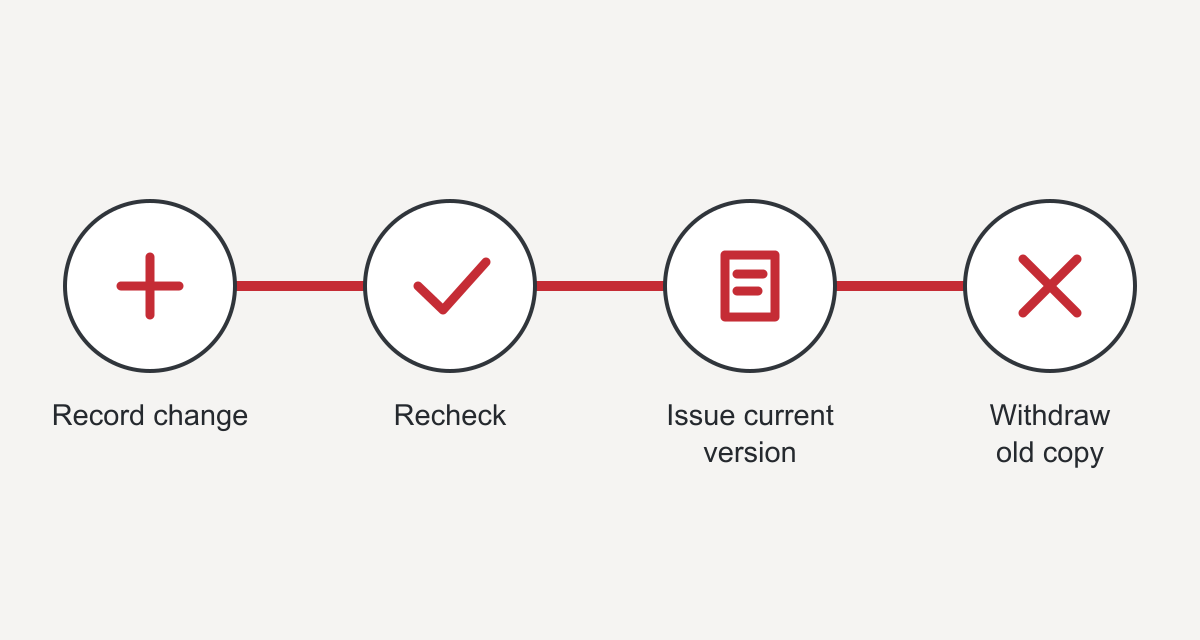
Include a short change note with each release: what changed, which journey legs are affected, what still needs an answer and who is responsible. Ask helpers to discard old printouts or mark them superseded, replace shared copies and acknowledge the current version. Tell affected passengers about changed assignments directly rather than expecting them to notice a revised attachment.
Reconcile the plan before boarding
Before using the list, check the actual vehicle against the information used for the latest worksheet. Reconcile the travelling group count, party changes and outstanding questions with the responsible organiser. If a seat reference cannot be matched, pause that assignment and refer the discrepancy to RL rather than improvising a new arrangement.
Keep one current working copy available to the organiser and relevant helpers. Share only the assignment information each person needs. If there is an unresolved boarding, luggage or access issue, an orderly list does not settle it; obtain the operator’s answer before treating the plan as ready.
Ready to clarify your arrangement? Contact RL Transport with your trip date, journey, passenger count and practical requirements. Ask for the allocated vehicle’s applicable layout or seat-reference method before distributing assignments. RL’s contact page also directs organisers to call or WhatsApp to confirm journey availability. Keep vehicle confirmation, worksheet checks and the current version together so the people helping your group can work from the same information.